Jira Search
This fence component allows to insert a table that displays the results of a Jira query. The syntax to write the query is described in the official JQL Documentation.
Basic usage
The basic usage of this block is to put the query directly in the fence. Example:
```jira-search
resolution = Unresolved AND assignee = currentUser() AND status = 'In Progress' order by priority DESC
```
The columns displayed in the table can be configured in the settings. See more
Advanced usage
It is possible to describe in each jira-search fence how the search results are rendered using the following keyworkds:
| Keyword | Description | Default | Values |
|---|---|---|---|
type | Rendering mode of the search results | TABLE | TABLE or LIST |
query | Query to use with Jira to retrieve the results | ||
limit | Maximum number of items to display | Use value from settings | Integer number |
columns | List of columns to render (Available columns) | Use value from settings | Comma separated list |
account | Explicitly select an account providing the alias | Try all account by priority | Account alias |
Example:
```jira-search
type: TABLE
query: status = 'In Progress' order by priority DESC
limit: 15
columns: KEY, SUMMARY, -ASSIGNEE, -REPORTER, STATUS
account: Default
```
Standard fields
The plugin is able to render as columns the following Jira standard fields:
KEY, SUMMARY, DESCRIPTION, TYPE, CREATED, UPDATED, REPORTER, ASSIGNEE, PRIORITY, STATUS, DUE_DATE,
RESOLUTION, RESOLUTION_DATE, PROJECT, ENVIRONMENT, LABELS, FIX_VERSIONS, COMPONENTS,
AGGREGATE_TIME_ESTIMATE, AGGREGATE_TIME_ORIGINAL_ESTIMATE, AGGREGATE_TIME_SPENT,
TIME_ESTIMATE, TIME_ORIGINAL_ESTIMATE, TIME_SPENT, AGGREGATE_PROGRESS, PROGRESS, LAST_VIEWED,
DEV_STATUS
- Columns names are case insensitive
- If the column starts with
-, the compact mode is used
Example:
```jira-search
query: status = 'In Progress' order by priority DESC
columns: key, -key, type, -type, reporter, -reporter, created, -created
```

Custom fields & Epic / Parent Aliases
Jira non-standard fields (a.k.a. custom fields) can be inserted using the $ symbol, specifying either the custom field name or ID number.
Example:
```jira-search
query: status = 'In Progress' order by priority DESC
columns: key, summary, $Epic Link, $Global Rank, $12313422, -$12313499
```
Built-in Epic & Parent Aliases
To provide universal compatibility across both Jira Cloud and Jira Server / Data Center, the plugin features smart alias resolution for Epic and Parent relationships:
| Alias | Description | Resolution Strategy |
|---|---|---|
$Epic Link or $Epic Name | Displays the Epic the issue belongs to as a colorized clickable pill | Automatically queries the Jira Cloud parent (if type is Epic) or Jira Server custom fields (customfield_XXXXX). |
$Parent or $Parent Link | Displays the parent issue (for subtasks or hierarchy levels) | Resolves the Jira parent field and falls back to Epic links. |
- If compact mode (
-$Epic Link) is used, only the Epic key is rendered in a pill badge. - When an Epic defines a color in Jira, the pill dynamically adopts that color.
- If the issue is a subtask whose direct parent is inside an Epic, the plugin recursively resolves the parent hierarchy.
Link to notes
The special column NOTES can be used with jira-search tables to create a column that shows all the notes that start with the issue key.
Example:
```jira-search
query: status = 'In Progress' order by priority DESC
columns: key, summary, status, notes
```
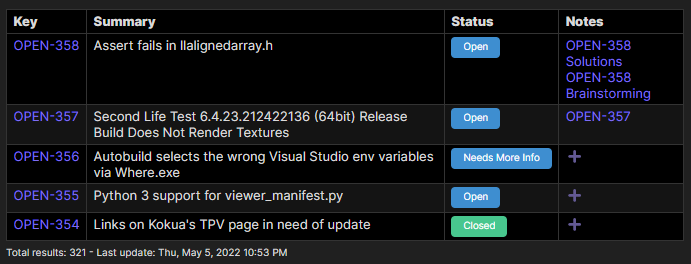
This column is useful to connect the issues with your notes about them. The note title must start with the issue key but it can also contains other letters after that. Examples:
AAA-123
AAA-123 User story summary
AAA-123 Custom string
If no notes are found, a ➕ button will be shown in order to allow the creation of a new note directly from this table.
Frontmatter
You can also access the frontmatter section of the linked notes using the jsonpath syntax after the column NOTES. Example:
query: status = 'In Progress' order by priority DESC
columns: key, notes, notes.title, notes.status, notes.tags, notes.tags[0], notes..book[?(@.price<30 && @.category=="fiction")]
Footer
At the bottom of each search table you have several information:
- Total results of the query
- Alias of the account used
- Last execution date
- Refresh results button
